• Skip to main content
  • Skip to secondary menu
  • Skip to primary sidebar
  • Skip to footer

HiTnFiND

Download Free PC Software and PC Games

  • Email
  • Facebook
  • Instagram
  • Twitter
  • YouTube
  • HOME
  • Operating System
  • Softwares
    • Anti Virus
    • Audio and Music Mp3
    • Benchmarking
    • Compression
    • Developer Tools
    • File Sharing
    • Multimedia
    • Mobile Apps
    • Multimedia
    • Network Tools
    • Office Work
    • Tweaking
    • Utilities
  • Tech News
  • Tutorials
  • Games
    • Action
    • Adventure
    • Fighting
    • Racing
    • shooting game
  • APK
    • Games
  • Online Tools
  • SEO Tools

How to Install Windows Server 2008 R2 as Workstation

August 28, 2016 by admin Leave a Comment

How to Install Windows Server 2008 R2 as Workstation can be installed in four different editions.

Please see the following four editions of Windows Server 2008

  • Windows Server 2008 R2 Enterprise
  • Windows Server 2008 R2 Datacenter
  • Windows Server 2008 R2 Standard
  • Windows Server 2008 R2 Web

To install and test Windows Server 2008 R2 you  need download the DVD-image file from the following link:

Windows Server 2008 R2 ISO Free Download

It doesn’t need any key.  You can use this for 180 days after activating. You can create bootable USB drive this ISO file using Rufus. After create bootabel flash drive follow the installation steps given below.


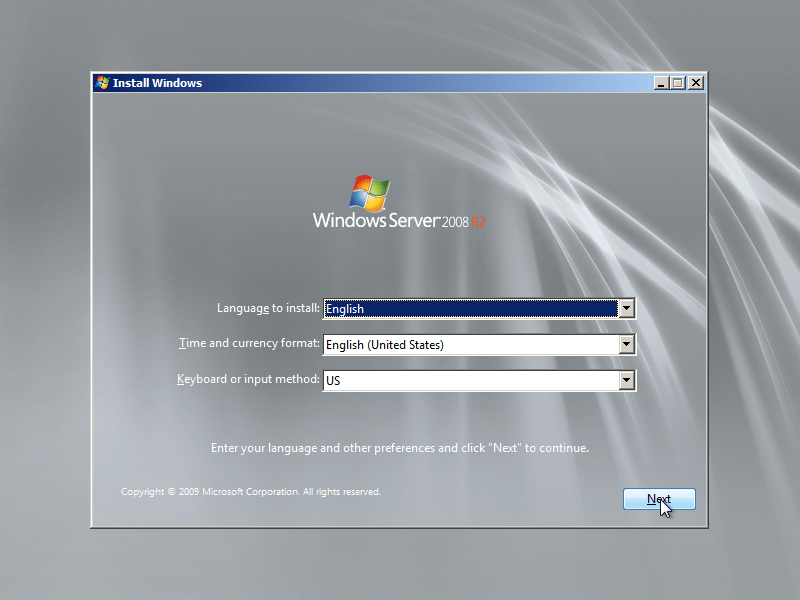
Step 1 : Boot your Windows Server 2008 R2 with bootable USB drive. After you see the screen below, choose the appropriate settings and click Next.
How to Install Windows Server 2008 R2 as Workstation

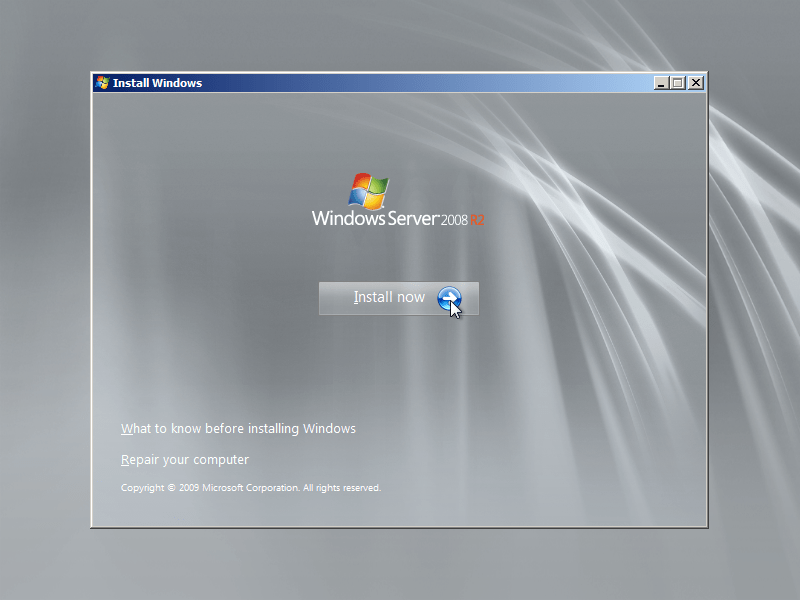
Step 2 : Now click Install now button.
How to Install Windows Server 2008 R2 as Workstation

Step 3 : Now select version of Windows Server 2008 R2 with Full Installation. Please do not select Server with Core Installation as they won’t have a Graphic user interface (GUI).

How to Install Windows Server 2008 R2 as Workstation

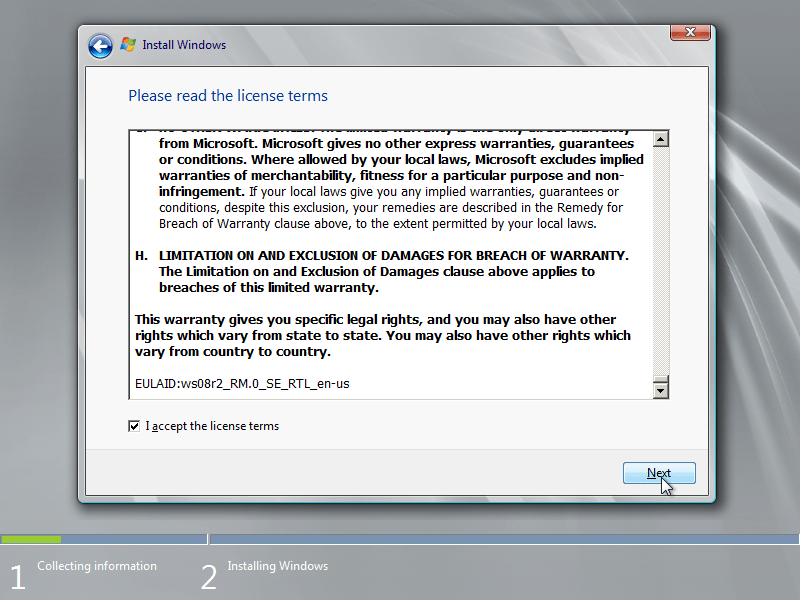
Step 4 : Now check the checkbox of I accept the license terms and then click next to proceed.
How to Install Windows Server 2008 R2 as Workstation

Step 5 : Now select Custom (advanced) it allows us to install a clean Windows Server 2008 R2. Upgrade option can be used to upgrade from earlier version of server or Windows Server 2008.

How to Install Windows Server 2008 R2 as Workstation

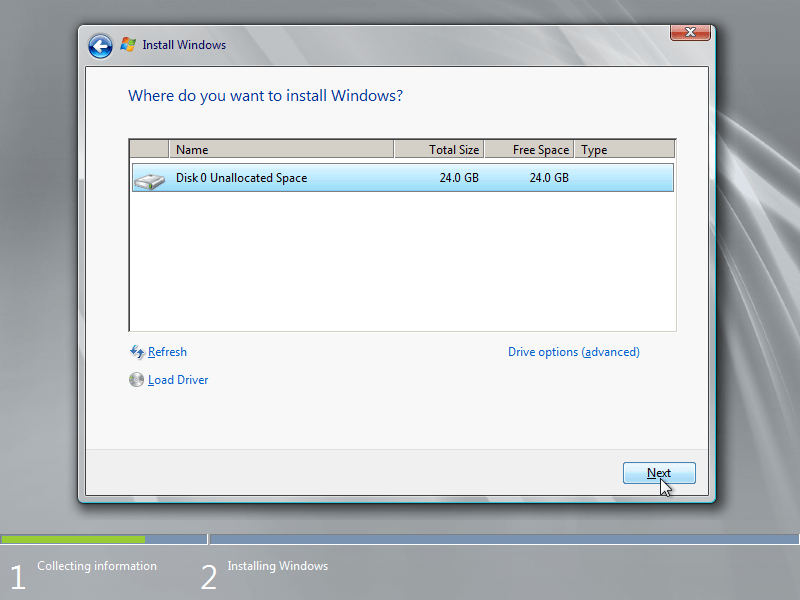
Step 6 : Now select the hard disk partition in which you want to install Windows Server 2008 R2 and click Next.
How to Install Windows Server 2008 R2 as Workstation

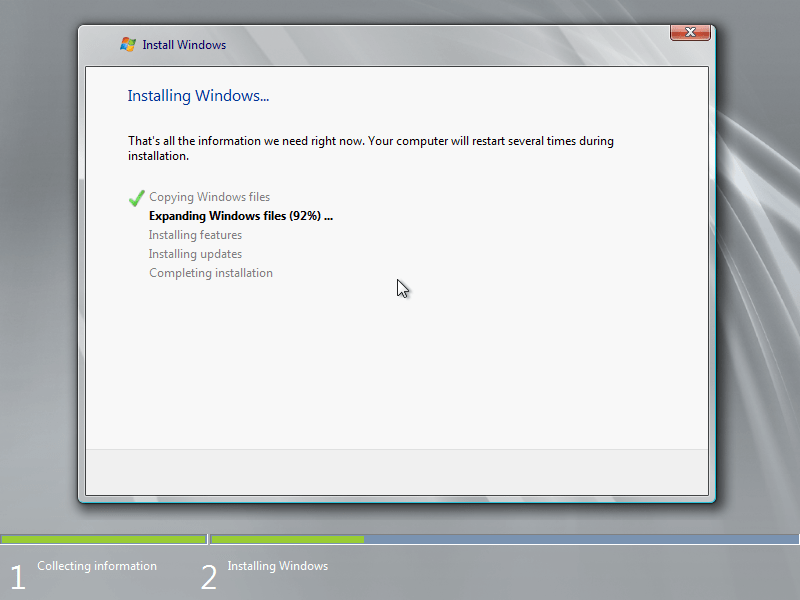
Step 7 : Windows Server 2008 R2 ISO setup will now install the selected version on your computer. See the following installation progress screenshots of Windows Server 2008 R2.

Copying Windows Files and Expanding Windows Files in process.
How to Install Windows Server 2008 R2 as Workstation

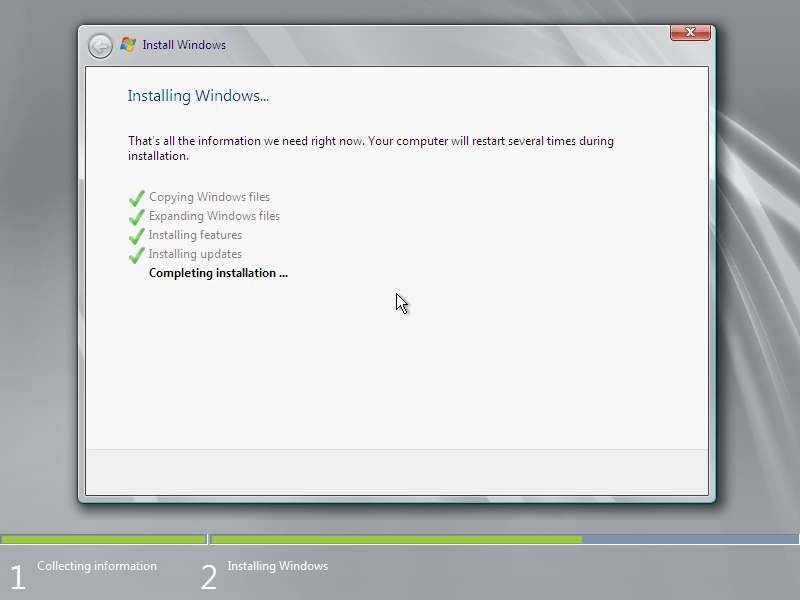
Step8 : Installing features and installing updated, completing installation in following screenshots
How to Install Windows Server 2008 R2 as Workstation

Step9 : Windows Server 2008 R2 setup is preparing your computer for first use

How to Install Windows Server 2008 R2 as Workstation

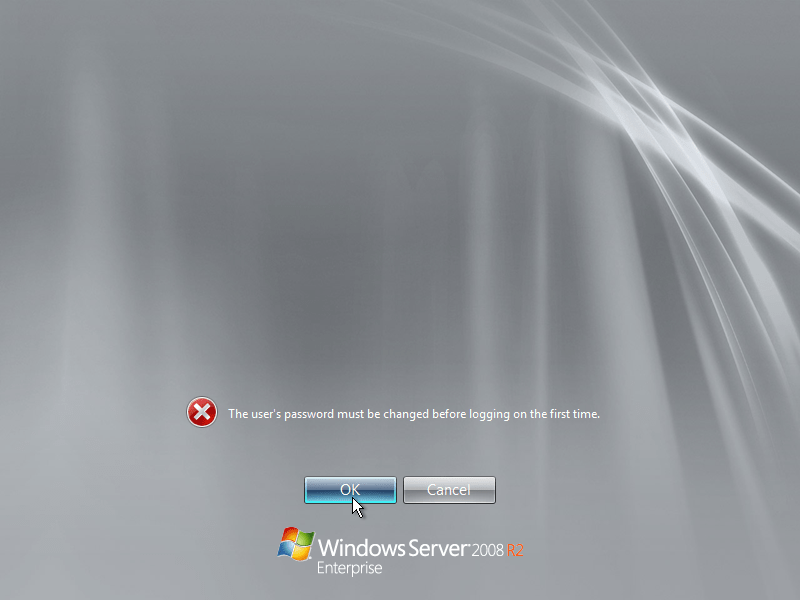
Step 10 : Now computer will restart and you need to put new password in order to use Windows Server 2008 R2. Click OK.
How to Install Windows Server 2008 R2 as Workstation

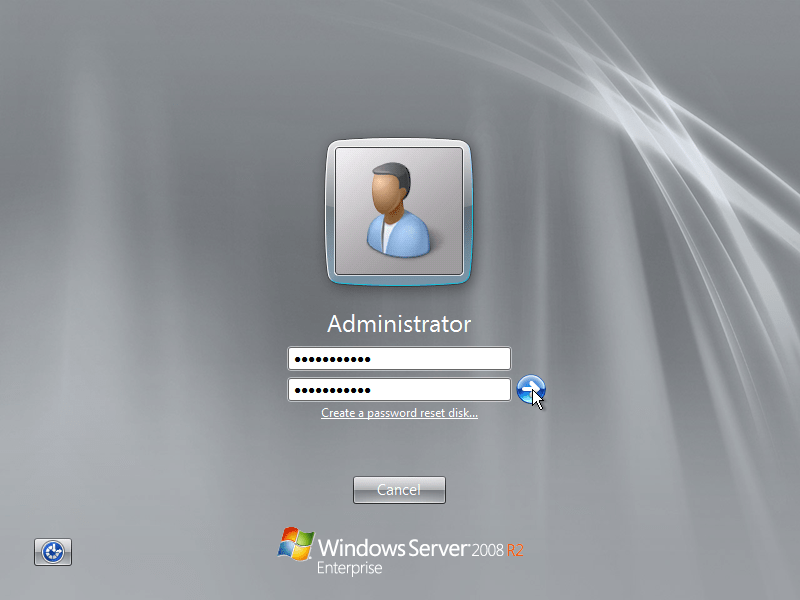
Step 11 : Here you need to put strong password. It should be alpha numeric with at least one capital letter and one number, for example Adm1n1strator (In this ‘A’ is in uppercase and replaced ‘i’ with numeric ‘1’)
How to Install Windows Server 2008 R2 as Workstation

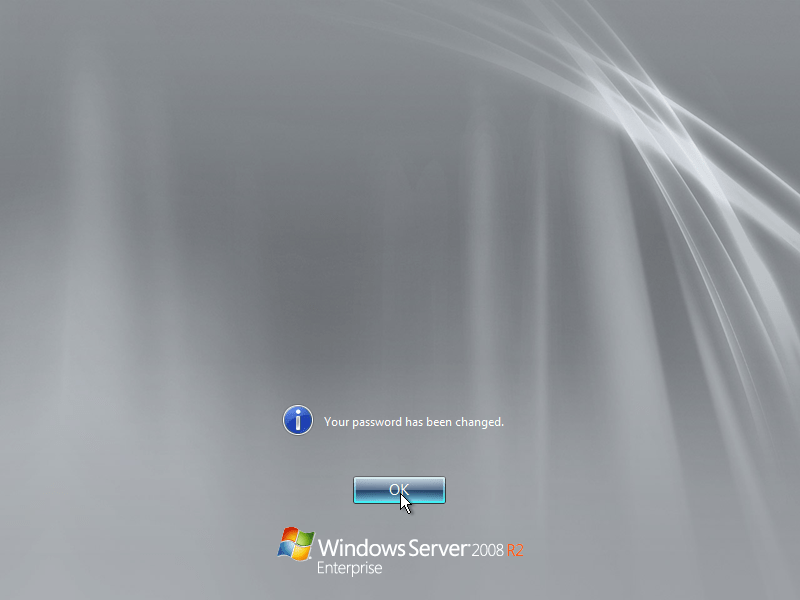
Step 12 : Now your password has been changed. Click ok to proceed and it will show your desktop first time.
How to Install Windows Server 2008 R2 as Workstation

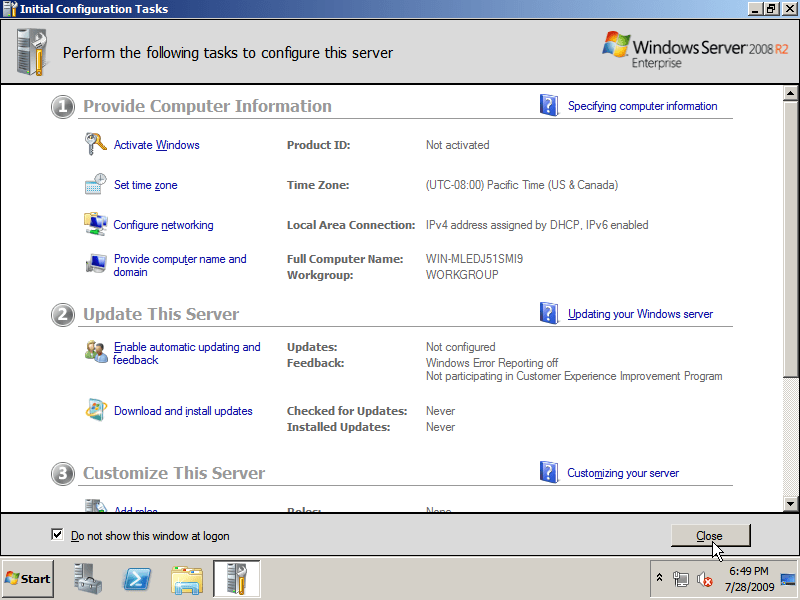
Step 13 : Check Do not show this window at logon in the Initial Configuration Tasks. You can use it later at any time using administrator tools.
How to Install Windows Server 2008 R2 as Workstation

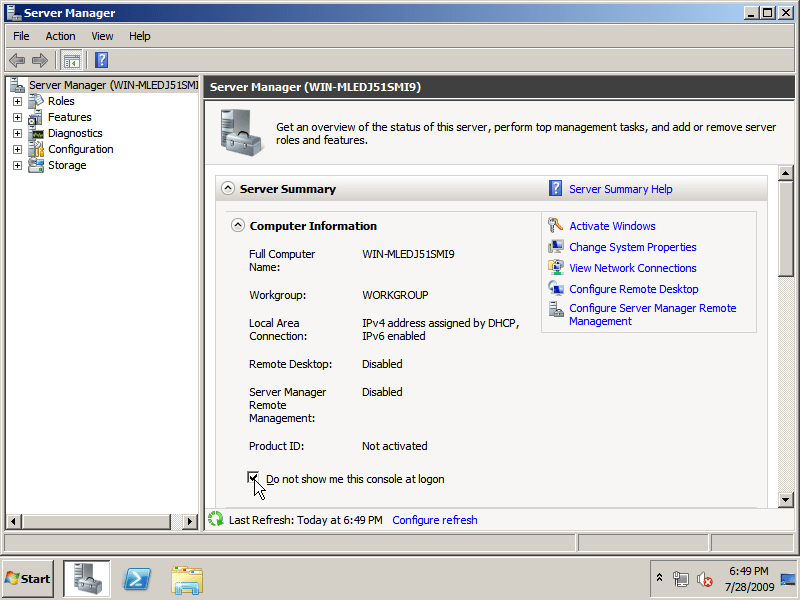
Step 14 : Check Do not show me this console at logon in the Server manager window. you can access it later from administrator tools.
How to Install Windows Server 2008 R2 as Workstation

Now you can use windows server 2008 R2 and configure it according to your requirements.


If you like this post please do comment and share.

How to Install Windows Server 2008 R2 as Workstation

Share this:

  • Click to share on Facebook (Opens in new window) Facebook
  • Click to share on X (Opens in new window) X
  • Click to share on Pinterest (Opens in new window) Pinterest
  • Click to share on LinkedIn (Opens in new window) LinkedIn
  • Click to share on Tumblr (Opens in new window) Tumblr
  • Click to share on Reddit (Opens in new window) Reddit
  • Click to share on Pocket (Opens in new window) Pocket

Like this:

Like Loading...

Related

Filed Under: Tutorials Tagged With: How to Install Windows Server 2008 R2 as Workstation, Windows Server 2008 Tutorial

Primary Sidebar

POPULAR DOWNLOADS

  • Need For Speed Most Wanted Free Download Full PC Game
    Need For Speed Most Wanted Free Download Full PC Game
  • Windows Repair Pro All In One Portable Tool Free Download
    Windows Repair Pro All In One Portable Tool Free Download
  • Tekken 3 Download Free PC Game
    Tekken 3 Download Free PC Game
  • Minecraft Online Download Free PC Game
    Minecraft Online Download Free PC Game
  • Real VNC Download Free
    Real VNC Download Free
  • Crystal Reports XI R2 ISO Free Download
    Crystal Reports XI R2 ISO Free Download
  • Need for Speed Most Wanted MOD APK Download Free
    Need for Speed Most Wanted MOD APK Download Free
  • Road Rash Game Setup Download Free for PC
    Road Rash Game Setup Download Free for PC
  • Subway Surfers Download Free PC Game
    Subway Surfers Download Free PC Game
  • Call of Duty Ghosts Free Download Full PC Game
    Call of Duty Ghosts Free Download Full PC Game

More to See

Free Online PDF to Word Converter to Convert PDF into Editable DOCX

Free Online PDF to Word Converter to Convert PDF into Editable DOCX

December 24, 2025 By admin

Free Online Unit Converter Tool for Length Weight Area and Temperature and more

Free Online Unit Converter Tool for Length Weight Area and Temperature and more

December 23, 2025 By admin

Footer

  • About
  • Contact US
  • Disclaimer
  • DMCA
  • EULA
  • Privacy & Cookie Policy
  • Terms & Conditions
  • Site Map

Recent

  • Premium URL Shortener
  • Free Online PDF to Word Converter to Convert PDF into Editable DOCX
  • Free Online Unit Converter Tool for Length Weight Area and Temperature and more
  • Free Modern Color Picker Tool for HEX RGB CMYK and Web Colors for Designers Developers and UI Projects
  • Free Online QR Code Generator for Websites URLs WiFi URL Text Email Phone & Social Media and Business Cards

RSS RSS

  • How to Increase the Speed of your Windows 10?

All trademarks, registered trademarks, product names and company names or logos mentioned herein are the property of their respective owners.

Disclosure: This online shop contain affiliate links, which means we may receive a commission if you click a link and purchase something that we recommended.

Support Our Work

Trusted Site Seal
SSL Certificate

Copyright © 2026 · www.hitnfind.com


Loading Comments...
 

    %d